Posts

Showing posts with the label Java

Issue with Eclipse and IntelliJ when multiple jdk versions are installed.

When we are using IntelliJ and Eclipse simultaneously and if we want to use multiple/separate JDK versions then we should set environment variable as needed and then IDE should be restarted. In IntelliJ if we want to use Java 11 and in eclipse Java 8 then just add Runtime Environment to IDE setting and even if Jdk 8 is installed it will work as needed. Conclusion: Jdk 8 installed Jdk 11 is unzipped "System Environment variable" JAVA_HOME is set to Jdk 11 Eclipse and IntelliJ Runtime Env setting set to 8 and 11 respectively.  It should work.
Getting java.util.List from google JSON

import com.google.gson.Gson; import com.google.gson.reflect.TypeToken; import com.google.gson.stream.JsonReader; import java.lang.reflect.Type; import java.util.List; import com.example.model.Employee; String empListJsonString = ""; Gson gson = new Gson(); Type collectionType = new TypeToken<List<Employee>>(){}.getType(); List<Employee> empList = gson.fromJson(empListJsonString, collectionType);

Cannot determine embedded database driver class for database type NONE - SpringBoot

When we create Spring boot starter web project in STS and selected Apache Derby (Any Embeded Database) while creating project and on running project as Run as Java Application   it may give following Error :- *************************** APPLICATION FAILED TO START *************************** Description: Cannot determine embedded database driver class for database type NONE Action: If you want an embedded database please put a supported one on the classpath. If you have database settings to be loaded from a particular profile you may need to active it (no profiles are currently active). Solution: We have to add following annotation @EnableAutoConfiguration(exclude={DataSourceAutoConfiguration.class}) to the class having main() method. Need to import following: import org.springframework.boot.autoconfigure.EnableAutoConfiguration; import org.springframework.boot.autoconfigure.jdbc.DataSourceAutoConfiguration;

Sort Map by Keys.

import java . util . HashMap ; import java . util . Map ; import java . util . TreeMap ; public class SortByKeyExample1 { public static void main ( String [ ] args ) { Map < String , String > unsortMap = new HashMap < String , String > ( ) ; unsortMap . put ( "Z" , "z" ) ; unsortMap . put ( "B" , "b" ) ; unsortMap . put ( "A" , "a" ) ; unsortMap . put ( "C" , "c" ) ; unsortMap . put ( "D" , "d" ) ; unsortMap . put ( "E" , "e" ) ; unsortMap . put ( "Y" , "y" ) ; unsortMap . put ( "N" , "n" ) ; unsortMap . put ( "J" , "j" ) ; unsortMap . put ( "M" , "m" ) ; unsortMap . put ( "F" , "f" ) ; System . out . pr...

Some awesome references for learning programming languages / frameworks.

Following are the youtube channels that I prefer to learn something new about programming languages / frameworks, this may help you in some way. DURGA EDUCATION Durga Software Solutions edureka! in28minutes java9s Java Brains Java By Kiran - Java and Selenium Learn English with Let's Talk - Free English Lessons Telusko Learnings MIT OpenCourseWare Navin Reddy Following are some sites that I prefer for theory part about programming languages / frameworks. http://www.mkyong.com/ https://www.javatpoint.com/ http://www.java4s.com/ http://java9s.com/ http://www.journaldev.com/ Following are some sites that I prefer for tutorials about programming languages / frameworks. http://javarevisited.blogspot.in/

How to set environment variables using command line?

For example, if the JDK is installed at C:\Program Files\Java\jdk1.8.0 , then you need to set: JAVA_HOM E = C:\Program Files\Java\jdk1.8.0 PATH = PATH + C:\Program Files\Java\jdk1.8.0\bin Setting these environment variables on Windows is not difficult. Just go to  Control Panel > System > Advanced system settings > Advanced > Environment Variables. You can see the whole steps to setup this stuff in the following article:  In command prompt hit following command: setx -m JAVA_HOME "C:\Program Files\Java\jdk1.8.0" setx -m PATH "%PATH%;%JAVA_HOME%\bin";

Eclipse Initializing Java Tooling Error

Image
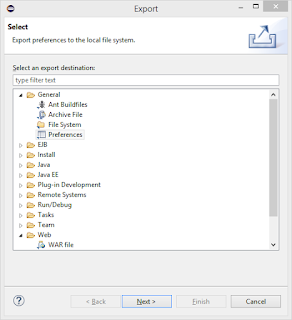
Following below steps can solve this issue, Step 1: Goto Menu File -> Export It will open a Window, Step 2: Select General -> Preferences Step 3: Click Next Step 4: Now check EXPORT ALL option and Select path where u want to store the preferences and click FINISH . Step 5: Exit Eclipse Step 6: Create a new workspace and then open Eclipse with this new workspace. Step 7: Now again Goto Menu -> File -> Import Step 8: Now select file exported in Step 4 Step 9: Now your Workspace is ready with your preferences, you just need to import your projects in this workspace and Now you will never face this issue of Initializing Java Tooling .

How to disable default success message in portlet?

Just have to add below lines in portlet.xml file inside <portlet>....</portlet> tag. <init-param> <name>add-process-action-success-action</name> <value>false</value> </init-param>

How to get context path in JQuery?

Suppose you want to get your context path in JS/JQuery on clicking an Button like, In JSP/HTML:- <input type="button" id="myButton"> In JQuery :- $('# myButton ').click(function() { console.log( myC ontextPath ); }); Then you can pass values to JS/JQuery as, <input type="button" id="myButton" myContextPath="${pageContext.request.contextPath}"> Then in JS/JQuery you can write as, $('# myButton ').click(function() {         var  myC ontextPath  = $(this).attr(' myC ontextPath '); console.log( myC ontextPath ); });

How to send mail from Liferay Portlet?

Image
import java.io.IOException; import javax.mail.internet.AddressException; import javax.mail.internet.InternetAddress; import javax.portlet.ActionRequest; import javax.portlet.ActionResponse; import javax.portlet.PortletException; import com.liferay.mail.service.MailServiceUtil; import com.liferay.portal.kernel.mail.MailMessage; import com.liferay.util.bridges.mvc.MVCPortlet; /** * Portlet implementation class FeedbackPortlet */ public class FeedbackPortlet extends MVCPortlet { public void sendEmail(ActionRequest actionRequest, ActionResponse actionResponse) throws IOException, PortletException { MailMessage mailMessage = new MailMessage(); mailMessage.setHTMLFormat(true); mailMessage.setBody("Your mail body"); mailMessage.setFrom(new InternetAddress("from_mail_id@something.com","Display Name in Inbox")); mailMessage.setSubject("Messag...

How to clear cache programmatically in JSP?

By adding below lines in JSP page we can achive this: <%              response.setHeader("Cache-Control","no-cache"); //HTTP 1.1              response.setHeader("Pragma","no-cache"); //HTTP 1.0              response.setDateHeader ("Expires", 0); //prevents caching at the proxy server   %> Other solution is by adding below lines in <head></head> of your JSP page: <meta http-equiv="Pragma" content="no-cache"> <meta http-equiv="Cache-Control" content="no-cache"> <meta http-equiv="Expires" content="Sat, 01 Dec 2001 00:00:00 GMT">

Steps to crearte facebook application at Facebook Developers Page.

Image
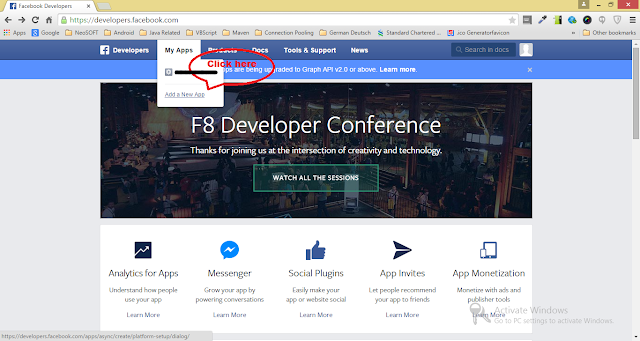
For login with facebook to work we have to create a facebook application at Facebook Developers Page using following steps, 1. Login to Facebook Developers Page . 2. Goto " My Apps " menu. 3. Click " Add a New App " option. 4. In popup select " WWW " symbol which represent website login. 5. Then give a application name in provided text field. 6. Click " Create New Facebook App ID " button 7. In next screen choose " Category " of your application. 8. Then click " Create App ID " button. 9. Then on next screen give your site URL. For development purpose use http://localhost:<port number>

Create a pdf file using java and encrypt / decrypt it.

For this example to work you will need following jar files. 1.  bcpkix-jdk15on-1.47.jar 2.   itextpdf-5.1.0.jar 3.   bcprov-jdk14-146.jar Download them and include them in your project classpath . /* * This class is part of the book "iText in Action - 2nd Edition" * written by Bruno Lowagie (ISBN: 9781935182610) * For more info, go to: http://itextpdf.com/examples/ * This example only works with the AGPL version of iText. */ import java.io.FileOutputStream; import java.io.IOException; import com.itextpdf.text.Document; import com.itextpdf.text.DocumentException; import com.itextpdf.text.Paragraph; import com.itextpdf.text.pdf.PdfWriter; import com.itextpdf.text.pdf.PdfReader; import com.itextpdf.text.pdf.PdfStamper; public class EncryptionPdf { /** User password. */ public static byte[] USER = "Hello".getBytes(); /** Owner password. */ public static byte[] OWNER = "World".getBytes...

How to refresh JSP page automatically after each time period?

<%@ page import="java.io.*,java.text.*,java.util.*"%> <html> <head> <title>Auto Refresh Header Example</title> </head> <body> <h2>Auto Refresh Header Example</h2> <% // Page will be auto refresh after 1 second response.setIntHeader("Refresh", 1); // Get Current Time DateFormat dateFormat = new SimpleDateFormat("yyyy/MM/dd HH:mm:ss"); Calendar cal = Calendar.getInstance(); out.println(dateFormat.format(cal.getTime())); %> </body> </html>

Login with Facebook example.

Below is the code for logging our application using Facebook. Note: Please change appId : ' 45366235237356756 ' with your Facebook application ID. <div id="fb-root"></div> <script> //Load the Facebook JS SDK (function(d) { var js, id = 'facebook-jssdk', ref = d.getElementsByTagName('script')[0]; if (d.getElementById(id)) { return; } js = d.createElement('script'); js.id = id; js.async = true; js.src = "http://connect.facebook.net/en_US/all.js"; ref.parentNode.insertBefore(js, ref); }(document)); // Init the SDK upon load window.fbAsyncInit = function() { FB.init({ appId : ' 45366235237356756 ', // App ID status : true, // check login status cookie : true, // enable cookie...

How to convert 24 hr format time in to 12 hr Format?

Here is the code to convert 24-Hour time to 12-Hour with AM and PM. If you don't want AM/PM then just replace hh:mm a with hh:mm. import java.text.SimpleDateFormat; import java.util.Date; public class Main { public static void main(String [] args) throws Exception { try { String _24HourTime = "22:15"; SimpleDateFormat _24HourSDF = new SimpleDateFormat("HH:mm"); SimpleDateFormat _12HourSDF = new SimpleDateFormat("hh:mm a"); Date _24HourDt = _24HourSDF.parse(_24HourTime); System.out.println(_24HourDt); System.out.println(_12HourSDF.format(_24HourDt)); } catch (Exception e) { e.printStackTrace(); } } } Output: Thu Jan 01 22:15:00 IST 1970 10:15 PM Another Solution: System.out.println(hr%12 + ":" + min + " " + ((hr>=12) ? "PM" : "AM"));

How to print any number into specific number of digits?

To print any integer in specific number of digits then we can use format() function from java.lang.String class. For e.g. public class LeadingZerosExample { public static void main(String[] args) { int number = 15; String formatted = String.format("%04d", number); System.out.println("Number with leading zeros: " + formatted); } } Output for this program will be as follows: Number with leading zeros: 0015

How to calculate time difference between a given time and current time in Java?

SimpleDateFormat dateFormat = new SimpleDateFormat("HH:mm:ss"); Date date = dateFormat.parse("17:40:00"); System.out.println(date); Date date2 = new Date(); date2 = dateFormat.parse(dateFormat.format(date2)); System.out.println(date2); Calendar calendar = Calendar.getInstance(); calendar.setTime(date); Calendar calendar2 = calendar.getInstance(); calendar2.setTime(date2); System.out.println((calendar2.getTimeInMillis() - calendar.getTimeInMillis())/60000);

How to check JVM settings?

You can use below command to check all detailed settings of JVM on linux as well as windows: # java -XshowSettings:all If everything goes well then OUTPUT can be like: VM settings:     Max. Heap Size (Estimated): 1.76G     Ergonomics Machine Class: client     Using VM: Java HotSpot(TM) 64-Bit Server VM Property settings:     awt.toolkit = sun.awt.windows.WToolkit     file.encoding = Cp1252     file.encoding.pkg = sun.io     file.separator = \     java.awt.graphicsenv = sun.awt.Win32GraphicsEnvironment     java.awt.printerjob = sun.awt.windows.WPrinterJob     java.class.path = .     java.class.version = 52.0     java.endorsed.dirs = C:\Program Files\Java\jre1.8.0_31\lib\endorsed     java.ext.dirs = C:\Program Files\Java\jre1.8.0_31\lib\ext         C:\Windows\Sun\Java\lib\ext     java.home = C:\Program Fi...

How to remove element from Array in Java with Example

For this example you will need to download  commons-lang-2.6.jar  and set it in your classpath. import java.util.Arrays; import org.apache.commons.lang.ArrayUtils; /** * * Java program to show how to remove element from Array in Java * This program shows How to use Apache Commons ArrayUtils to delete * elements from primitive array. * * @author http://javareinvented.blogspot.in */ public class RemoveObjectFromArray{ public static void main(String args[]) { //let's create an array for demonstration purpose int[] test = new int[] { 101, 102, 103, 104, 105}; System.out.println("Original Array : size : " + test.length ); System.out.println("Contents : " + Arrays.toString(test)); //let's remove or delete an element from Array using Apache Commons ArrayUtils test = ArrayUtils.remove(test, 2); //removing element at index 2 //Size of array must be 1 less than original arr...