Posts

Showing posts with the label Git

Highlight changes related to repository in Eclipse.
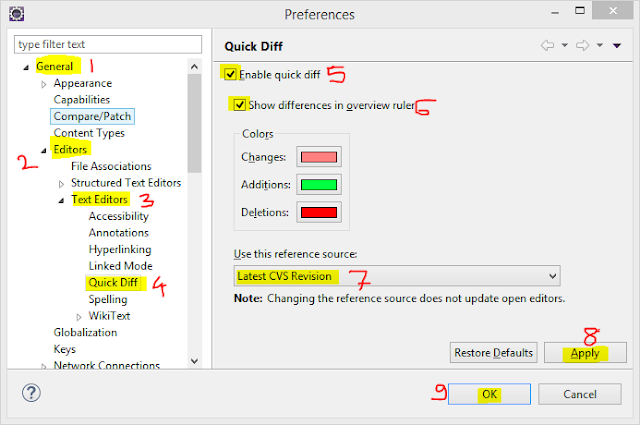
Image
Goto Menu -> Windows -> Preferences Above window will get opened, then follow below steps:- Step 1: Goto General Step 2: Editors Step 3: Text Editors Step 4: Quick Diff Step 5: Enable Quick Diff Step 6: Show Differences in Overview ruler Step 7: Select - Latest CVS Revision Step 8: Click Apply Step 9: Click OK Now you can see difference in editors, if not seen then restart eclipse once.

Push a new local branch to a remote Git repository and track it too

1. To create a new local branch use following command, $ git checkout -b feature_branch_name 2. Make changes to files you want and add+commit them, then fire following command to push local branch to repository, $ git push -u origin feature_branch_name

Git merge options for merging conflicted changes. (Our or Theirs)

We can  tell Git to favor one side or the other when it sees a conflict. By default, when Git sees a conflict between two branches being merged, it will add merge conflict markers into your code and mark the file as conflicted and let you resolve it. If you would prefer for Git to simply choose a specific side and ignore the other side instead of letting you manually resolve the conflict, you can pass the   merge   command either a   -Xours   or   -Xtheirs . If Git sees this, it will not add conflict markers. Any differences that are mergeable, it will merge. Any differences that conflict, it will simply choose the side you specify in whole, including binary files. $ git merge mundo Auto-merging hello.rb CONFLICT (content): Merge conflict in hello.rb Resolved 'hello.rb' using previous resolution. Automatic merge failed; fix conflicts and then commit the result. However if we run it with   -Xours   or   -Xtheirs   it does n...