Posts

Showing posts with the label Eclipse

Issue with Eclipse and IntelliJ when multiple jdk versions are installed.

When we are using IntelliJ and Eclipse simultaneously and if we want to use multiple/separate JDK versions then we should set environment variable as needed and then IDE should be restarted. In IntelliJ if we want to use Java 11 and in eclipse Java 8 then just add Runtime Environment to IDE setting and even if Jdk 8 is installed it will work as needed. Conclusion: Jdk 8 installed Jdk 11 is unzipped "System Environment variable" JAVA_HOME is set to Jdk 11 Eclipse and IntelliJ Runtime Env setting set to 8 and 11 respectively.  It should work.
Highlight changes related to repository in Eclipse.

Image
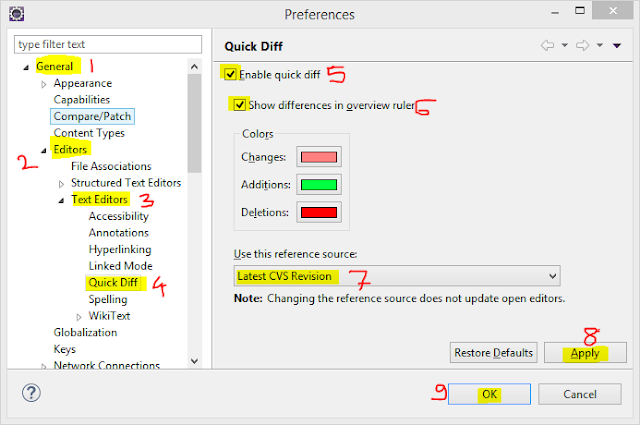
Goto Menu -> Windows -> Preferences Above window will get opened, then follow below steps:- Step 1: Goto General Step 2: Editors Step 3: Text Editors Step 4: Quick Diff Step 5: Enable Quick Diff Step 6: Show Differences in Overview ruler Step 7: Select - Latest CVS Revision Step 8: Click Apply Step 9: Click OK Now you can see difference in editors, if not seen then restart eclipse once.

Eclipse Initializing Java Tooling Error

Image
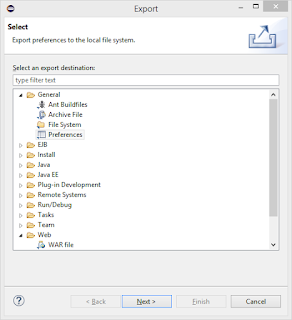
Following below steps can solve this issue, Step 1: Goto Menu File -> Export It will open a Window, Step 2: Select General -> Preferences Step 3: Click Next Step 4: Now check EXPORT ALL option and Select path where u want to store the preferences and click FINISH . Step 5: Exit Eclipse Step 6: Create a new workspace and then open Eclipse with this new workspace. Step 7: Now again Goto Menu -> File -> Import Step 8: Now select file exported in Step 4 Step 9: Now your Workspace is ready with your preferences, you just need to import your projects in this workspace and Now you will never face this issue of Initializing Java Tooling .