Posts

Showing posts with the label Facebook login

Steps to crearte facebook application at Facebook Developers Page.
Image
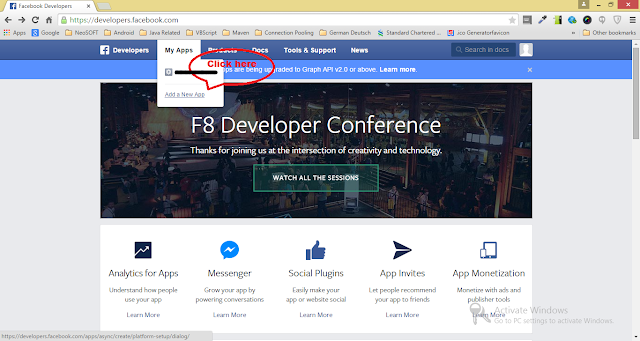
For login with facebook to work we have to create a facebook application at Facebook Developers Page using following steps, 1. Login to Facebook Developers Page . 2. Goto " My Apps " menu. 3. Click " Add a New App " option. 4. In popup select " WWW " symbol which represent website login. 5. Then give a application name in provided text field. 6. Click " Create New Facebook App ID " button 7. In next screen choose " Category " of your application. 8. Then click " Create App ID " button. 9. Then on next screen give your site URL. For development purpose use http://localhost:<port number>

Login with Facebook example.

Below is the code for logging our application using Facebook. Note: Please change appId : ' 45366235237356756 ' with your Facebook application ID. <div id="fb-root"></div> <script> //Load the Facebook JS SDK (function(d) { var js, id = 'facebook-jssdk', ref = d.getElementsByTagName('script')[0]; if (d.getElementById(id)) { return; } js = d.createElement('script'); js.id = id; js.async = true; js.src = "http://connect.facebook.net/en_US/all.js"; ref.parentNode.insertBefore(js, ref); }(document)); // Init the SDK upon load window.fbAsyncInit = function() { FB.init({ appId : ' 45366235237356756 ', // App ID status : true, // check login status cookie : true, // enable cookie...