Posts

How to get context path in JQuery?

Suppose you want to get your context path in JS/JQuery on clicking an Button like, In JSP/HTML:- <input type="button" id="myButton"> In JQuery :- $('# myButton ').click(function() { console.log( myC ontextPath ); }); Then you can pass values to JS/JQuery as, <input type="button" id="myButton" myContextPath="${pageContext.request.contextPath}"> Then in JS/JQuery you can write as, $('# myButton ').click(function() {         var  myC ontextPath  = $(this).attr(' myC ontextPath '); console.log( myC ontextPath ); });

How to send mail from Liferay Portlet?

Image
import java.io.IOException; import javax.mail.internet.AddressException; import javax.mail.internet.InternetAddress; import javax.portlet.ActionRequest; import javax.portlet.ActionResponse; import javax.portlet.PortletException; import com.liferay.mail.service.MailServiceUtil; import com.liferay.portal.kernel.mail.MailMessage; import com.liferay.util.bridges.mvc.MVCPortlet; /** * Portlet implementation class FeedbackPortlet */ public class FeedbackPortlet extends MVCPortlet { public void sendEmail(ActionRequest actionRequest, ActionResponse actionResponse) throws IOException, PortletException { MailMessage mailMessage = new MailMessage(); mailMessage.setHTMLFormat(true); mailMessage.setBody("Your mail body"); mailMessage.setFrom(new InternetAddress("from_mail_id@something.com","Display Name in Inbox")); mailMessage.setSubject("Messag...

How to clear cache programmatically in JSP?

By adding below lines in JSP page we can achive this: <%              response.setHeader("Cache-Control","no-cache"); //HTTP 1.1              response.setHeader("Pragma","no-cache"); //HTTP 1.0              response.setDateHeader ("Expires", 0); //prevents caching at the proxy server   %> Other solution is by adding below lines in <head></head> of your JSP page: <meta http-equiv="Pragma" content="no-cache"> <meta http-equiv="Cache-Control" content="no-cache"> <meta http-equiv="Expires" content="Sat, 01 Dec 2001 00:00:00 GMT">

How to remove do-search.com from Mozilla Firefox?

Step 1. Open Firefox Step 2. In Address Bar type  about:config then hit enter. Step 3. Then Click I'll be careful, I promise!  button. Step 4. Then at top in Search text box type  do-search and you will get all entries for this infection. Step 5. Right click on them one by one and select RESET option. Step 6. Then Restart Firefox.

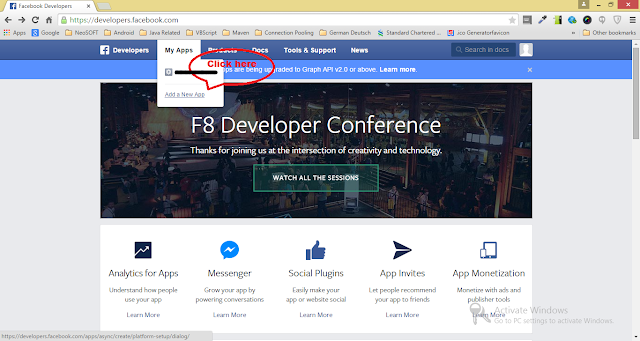
Steps to crearte facebook application at Facebook Developers Page.

Image
For login with facebook to work we have to create a facebook application at Facebook Developers Page using following steps, 1. Login to Facebook Developers Page . 2. Goto " My Apps " menu. 3. Click " Add a New App " option. 4. In popup select " WWW " symbol which represent website login. 5. Then give a application name in provided text field. 6. Click " Create New Facebook App ID " button 7. In next screen choose " Category " of your application. 8. Then click " Create App ID " button. 9. Then on next screen give your site URL. For development purpose use http://localhost:<port number>

Create a pdf file using java and encrypt / decrypt it.

For this example to work you will need following jar files. 1.  bcpkix-jdk15on-1.47.jar 2.   itextpdf-5.1.0.jar 3.   bcprov-jdk14-146.jar Download them and include them in your project classpath . /* * This class is part of the book "iText in Action - 2nd Edition" * written by Bruno Lowagie (ISBN: 9781935182610) * For more info, go to: http://itextpdf.com/examples/ * This example only works with the AGPL version of iText. */ import java.io.FileOutputStream; import java.io.IOException; import com.itextpdf.text.Document; import com.itextpdf.text.DocumentException; import com.itextpdf.text.Paragraph; import com.itextpdf.text.pdf.PdfWriter; import com.itextpdf.text.pdf.PdfReader; import com.itextpdf.text.pdf.PdfStamper; public class EncryptionPdf { /** User password. */ public static byte[] USER = "Hello".getBytes(); /** Owner password. */ public static byte[] OWNER = "World".getBytes...

How to refresh JSP page automatically after each time period?

<%@ page import="java.io.*,java.text.*,java.util.*"%> <html> <head> <title>Auto Refresh Header Example</title> </head> <body> <h2>Auto Refresh Header Example</h2> <% // Page will be auto refresh after 1 second response.setIntHeader("Refresh", 1); // Get Current Time DateFormat dateFormat = new SimpleDateFormat("yyyy/MM/dd HH:mm:ss"); Calendar cal = Calendar.getInstance(); out.println(dateFormat.format(cal.getTime())); %> </body> </html>